Office of Technology
The Office of Technology is secured from public access due to the sensitive nature of the equipment and the data we maintain. This is consistent with the requirements of technology offices at institutions and companies throughout the country.
If you need access to one of the technology staff, please call or come to the Office of Technology Help Desk located on the 4th floor of Louis Bennett Hall. The Office of Technology Help Desk is open Monday - Friday from 8:00 a.m. to 4:00 p.m. Please call 304-462-6140, or if on campus, extension 6140 for assistance. If you need special assistance, please call extension 6140 or 304-462-6140 for an appointment, and we will be happy to allow you admittance through the access door located at the stairwell coming from the Administration Building.
- Wireless Authentication
Your credentials and passwords will be supplied to you by the Office of Technology. As with the students you need to authenticate your account on a computer connected to the network before attempting to connect to the wireless network. Username: GSU\John.Doe and the password provided by the Office of Technology.
You should always connect to “GSU” wireless on campus.
Several guides have been written to step you through configuring your mobile device for access to the campus wireless network; other OS are simple and straightforward and should require no guide:
- Android OS
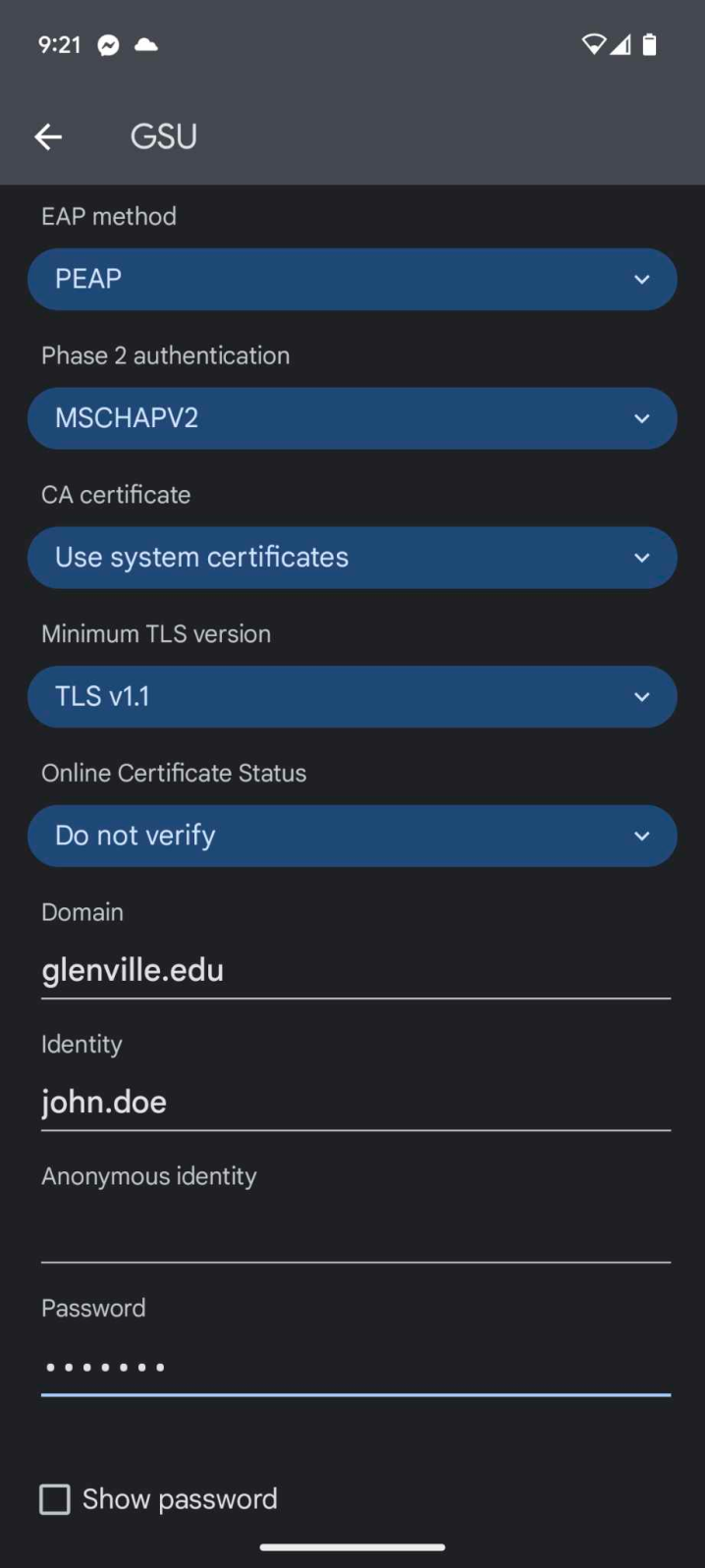
- Upon selecting the GSU network from your Android device’s wireless list, you will be presented with a screen with at least the following three fields: EAP method, Phase 2 authentication, CA certificate, Identity, Anonymous Identity, and Password.
- EAP method, select PEAP
- Phase 2 authentication, select MSCHAPV2
- CA certificate, select Use system certificates
- TLS if available use TLS v1.1
- Online Certificate Status leave as Do not verify
- For Domain enter glenville.edu
- Enter your glenville.edu username in the Identity field: john.doe
- Anonymous identity delete out anonymous if it is there.
- Enter the password J******d
- Click Connect.
- Apple iOS
- Select the GSU network from your iOS device’s WiFi selection list.
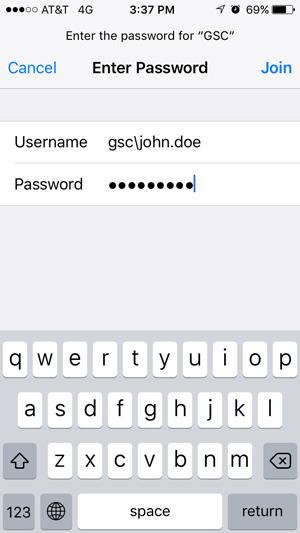
- Enter your glenville.edu username in the Identity field: john.doe
Enter the password J******d and click “Join”
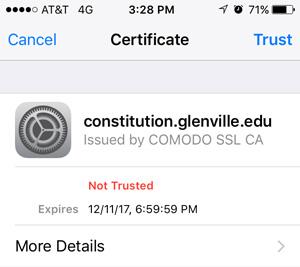
- You will get a notification about a non‐trusted certificate. Click “Trust”.
- Computer Lab Locations
Pioneer Support Center Computer Lab
This lab is open from 8:00 am to 8:00 pm Monday through Friday. This lab is made up of 16 computer stations plus an instructor station connected to a Smartboard. These machines have Windows 10, Office 2019, and a network printer.
Heflin Administration Building Computer Lab AB 309A
This lab is open for classroom use only. This lab is made up of 26 computer stations plus an instructor station connected to a data projector and sound system. These machines have Windows 10, Office 2019, and a network printer.
Heflin Administration Building Computer Lab AB 309B
This lab is open for classroom use only. This lab is made up of 28 computer stations plus an instructor station connected to a data projector and sound system. These machines have Windows 10, Office 2019, Adobe CC Master Collection, and a network printer.
Center for Teaching Excellence Lab
This lab is open only for our Faculty and Staff for training and cross training. The lab is made up of 12 stations plus an instructor station connected to a Smartboard and sound system. These machines have Windows 10, Office 2019, Banner 9, and Webcams with microphones.
Land Resources Lab
This lab contains 24 workstations running Windows 10, Office 2019, Carlson, ArcGIS, Geoviewer, AutoCAD, Google Earth, and ISISDraw. As well as a teaching station connected to a large screen LED monitor, document camera, and sound.
Robert F. Kidd Library Lab
This lab is open for general use during library hours. There are 45 stations with Windows 10. All machines have Office 2019, Geometer’s Sketchpad and are connected to two network printers.
Fine Arts Piano Lab
This lab is open for use by Music Majors. There are 9 stations plus an instructor station. These machines have Windows 10, Office 2019, and Finale 2012 and are connected to a printer.
Fine Arts Gallery Lab
This lab is open for use by Digital Art Majors. There are 12 stations plus an instructor station. These machines have Windows 10, Office 2016, and Adobe CC Master Collection and are connected to a printer.
Science Hall Lab
This lab is open for classroom use only. This lab is for our Science Department and is made up of 24 stations plus an instructor station connected to a mounted data projector, document camera, and sound system. These machines have Windows 10, Office 2019, Geometer’s Sketchpad, and a variety of Science and Math related software. As well as, a teaching station connected to a projector, document camera, and sound.
Science Hall Physics Lab
This lab is open for classroom use only. This lab is for use by our Physical Sciences students. The lab is made up of 12 stations plus an instructor station connected to a mounted data projector, document camera, and sound system. These machines have Windows 10, Office 2019, Geometer’s Sketchpad, and a variety of Science and Math related software. As well as, a teaching station connected to a projector, document camera, and sound.
Student Support Services Lab
This lab is open from 8:00 am to 4:00 pm to assist students in the Student Support Services program. It is used for tutoring and developmental studies. There are 5 computers running Windows 10 and Office 2016 with a network printer. There are also two iMac computers.
Heflin Administrative Building Classrooms
There are 9 classrooms outfitted with a teaching station connected to large Lite Touch displays.Clark Hall
There are 6 classrooms outfitted with teaching stations connected to a Smartboard. One classroom contains a teaching station connected to a dual-screen projector system.Fine Arts
There is one classroom outfitted with a teaching station, mounted projector, and sound system and one classroom outfitted with a teaching station, Smartboard, and sound system. One classroom is fitted with a portable projector and laptop. One classroom contains a mounted Smart TV, webcam, Apple TV, and sound.Land Resources Waco Center
There are 6 classrooms with teaching stations connected to a large Lite Touch displays, document camera, and sound system.Physical Education
There are 3 classrooms outfitted with a teaching station connected to a large Lite Touch display.Mollohan Center
There are two large multipurpose rooms, one with stadium seating and one in the Rusty Musket. These rooms both have data projectors, DVD, Cable TV, and sound systems.Science Hall
There are six classrooms outfitted with teaching stations, mounted projectors, document camera and sound.